⭐️ Suppress the Import of Stored Images: There are scenarios where you might want to require drivers to scan documents or capture photographs in real time versus importing from their device gallery or camera roll. This is often the case when it comes to accident photos, load securement, or pre- and post-trip inspections.
In this release, we’ve provided the option to force drivers to capture images in real time by setting `allow_library_import` to false via API. You can also control this setting in Platform Dashboard by unchecking “Allow users to import images” anywhere Document Scan actions are configured. This functionality is available for actions, menu items, custom screens, to do items, and inline document capture on forms. Importing images continues to be enabled by default.

⭐️ Added the ability for drivers to toggle showing and hiding their password on the login screen.
🔧 The mobile apps no longer use the SCAN-MODE field on forms when scanning documents. Now, the capture mode is determined by the document type. If a document type field is not provided, the app defaults to the document capture mode, which enhances the image.
iOS
🐞 Fixed a crash that would occur when a user logs out of the app with unfinished processes running in the background.
🐞 Fixed a bug where tapping the HOS card or adding a team driver would not properly launch the Geotab app and would instead take the user to the app store to download the app.
🐞 Fixed a bug where routing errors displayed a default error message. Drivers will now see stop-specific routing errors.
🐞 Fixed a bug where HOS clocks would overlap on the dashboard when the Driver Status response included duplicate values.
Android
🔧 Drivers using specific Pixel and Motorola devices are now able to select and import PNG images during the document capture process.
🐞 Fixed a bug where team drivers could not log in when the driver was configured to use the Geotab OpenCab integration but the app fell back to the legacy Geotab integration.
✅ As usual, this version of the Platform mobile app is designed to be backward-compatible with your existing web services and doesn’t require server changes prior to being deployed. If a future version introduces a backward-incompatible change, we’ll note that in this portion of the release notes.
Server and App Editor
The following items are server-side changes and are available without a mobile app update.
⭐️ Build a New Route with Your Pluggable Router in Trip Planner Studio: You can now preview and evaluate how routes might import and be displayed to drivers in the mobile app using your pluggable router. Trip Planner Studio’s Build a New Route tool now allows you to select any routing engine configured in the environment in which you’re testing.

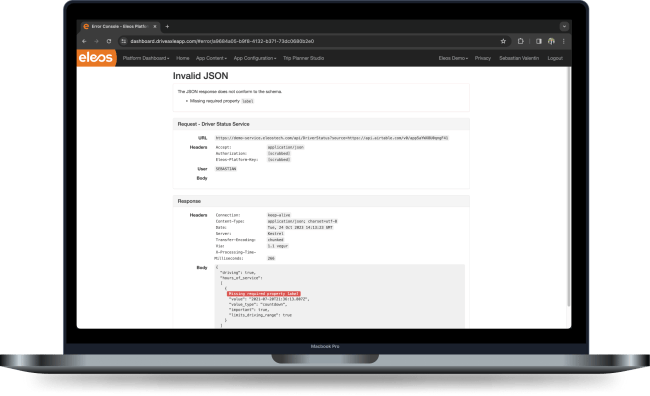
🐞 Fixed an issue causing Error Console messages to omit details about required fields in your web service’s response. Error Console now points out exactly which property is missing in a nested object.