
⭐️ Add Stop Using Current Location: When adding a stop in Trip Planner, drivers can now specify their current location with a single tap. Drivers who add current location to their trip will see a route, drive-time and distance that takes this newly added leg into consideration. In addition, when enabled, drivers will have access to all our standard trip planning features for the new leg, including difficult maneuvers, finding POIs along a route, traffic conditions, and HOS expiration.

⭐️ OpenCab User Switching: In collaboration with OpenCab partners, we’ve expanded the OpenCab specification to enable users to easily switch between accounts in team driver scenarios, ensuring both applications show the same user session without the need for repeated logins.
Specifically, with our Geotab OpenCab integration, the Eleos Platform app will automatically switch who is logged in on Eleos based on who the active driver is in Geotab Drive. In Geotab Drive, the active driver is the user with the steering wheel icon next to their name. When the Eleos Platform app switches, users will see a message informing them which account they are being logged in to.
🔧 Increased maximum length for the Help Link label on the mobile app Login screen from a 15 characters to 25 characters.
iOS
🔧 iOS now matches Android with non-case sensitive load counts on the Dashboard Loads card. For example, having two loads with status codes “PLANNED” and “planned” will show as having two loads in the planned status.
🔧 Previously, iOS would take the user to the sent messages screen after sending a form from anywhere in the app. Now, iOS matches Android by taking the user back to the screen they launched the form from. For example, if a user sends a form from an action on the dashboard, they’ll be taken to the dashboard after sending the form.
🔧 Updated URL handling to continue supporting URLs with colons on devices running iOS 17 and newer.
🔧 Updated the Document Detail screen to show all of the document types the user selected. Previously, we displayed a truncated list.
🐞 Fixed a bug where server-side form validation requests and workflow messages were not sending the same time format as Android. Both platforms now send message requests with the composed_at field in identical RFC 3339 format
🐞 Fixed a bug where the MyTruck card on the dashboard would only show one line of text and cut off any additional text.
🐞 Fixed an issue where remaining on the Messages screen while inactive for an extended period of time could cause a crash.
🐞 Fixed an issue where payroll fields were not properly left-justified.
Android
🐞 Fixed a bug where the dashboard would not display new cards or data received when the app receives a verify response. Now those changes are displayed immediately after being received.
🐞 Fixed a crash that would occur when a user logs out of the app with unfinished processes running in the background.
🐞 Fixed a crash that would occur when the app attempted to pull HOS data via OpenCab and the request timed out.
✅ As usual, this version of the Platform mobile app is designed to be backwards-compatible with your existing web services and doesn’t require server changes prior to being deployed. If a future version introduces a backwards-incompatible change, we’ll note that in this portion of the release notes.
Server & App Editor
The following items are server-side changes and are available without a mobile app update.
⭐️ Drag and Drop: We’ve expanded drag and drop to the Dashboards and Menus pages. Users can reorder items on those pages with the same drag and drop functionality available on the Media Libraries and Forms pages.
⭐️ Pluggable Routing Patches: We now have the ability to patch certain pluggable routes that fail to import. When applicable, drivers will receive a route that matches your pluggable route up to and beyond the point of failure. The failed segment is patched with a set of waypoints derived from our native router. These patched routes are then able to be imported and delivered to drivers within the app.
If you experience a pluggable routing failure and would like it evaluated for a potential patch, please submit the environment, user, load ID and timestamp of failed route import to the Eleos Support Team.
We’ve updated Trip Planner Studio snapshots and Build a New Route to tell you when a pluggable route has been patched.
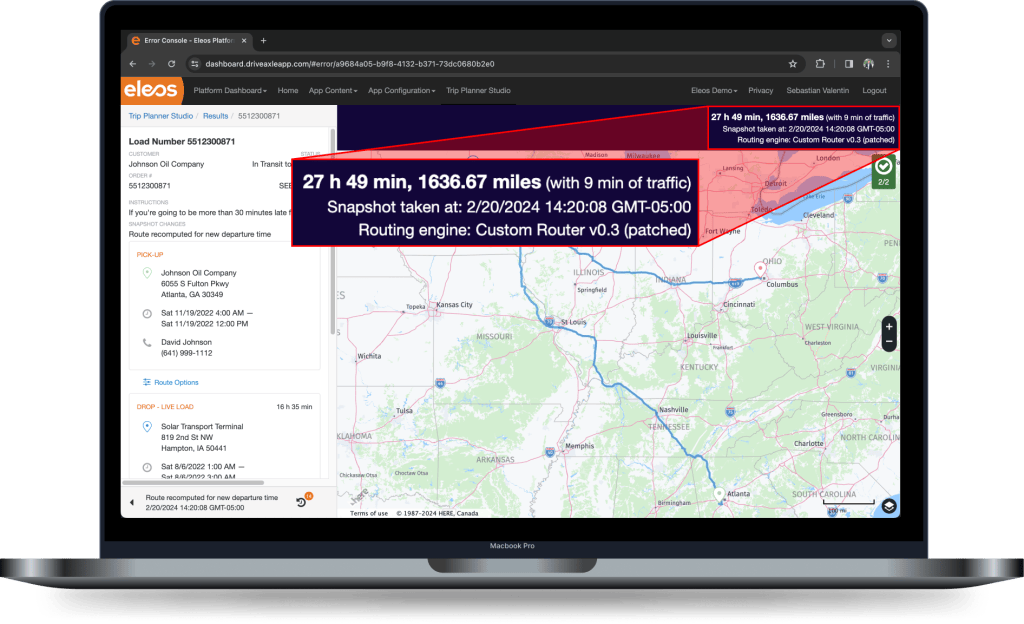
Trip Snapshots and Trip Changes APIs have also been updated to include a new “route_patched” parameter to indicate when a pluggable route has been patched.
🔧 Trip Planner Studio has been enhanced to make it easier for you to differentiate, at-a-glance, whether or historical snapshot is planning-related or navigation-related. Planning snapshots will feature the current purple header; navigation snapshots will now display with a green header.

⚠️ Removed “Search Route History” from the Trip Planner Studio landing page in favor of the more comprehensive “Search Trip Plans”.
🔧 Effective February 1, 2024, the mobile mobile app was modified to require users to accept terms of use on login. Users have access to the terms via a link on the login screen titled “Terms of Use.” You can provide your own URL if you wish to reference your own legal language, in which case you must also reference Eleos Terms of Use. If no URL is provided, the link renders Eleos’s terms. This change is to ensure that our users, customers and Eleos are legally protected and in compliance with our standard contractual terms.
🔧 We’ve optimized database connections to ensure our systems meet uptime requirements and expectations. During periods of large error volume, a percentage of web service errors may not be reflected in the Error Console or the Error Console API to protect overall system stability. Please note that periods of large error volume are infrequent.
🐞 Fixed an issue where the Media Items API was failing to upload media items when filenames contained space characters.
🐞 Fixed a bug where entering an invalid URL on the actions, dashboards, menus or customer screen pages would cause the page to display a blank white screen.
🐞 Increased the zoom speed when viewing a snapshot or route on Trip Planner Studio.
🐞 Fixed a bug on Trip Planner Studio where the map would zoom in too far and not display all of the pins for a route.
🐞 Fixed a bug where sending an offline workflow action and then going back online to send the next workflow action would cause form fields with custom stop data to not substitute or pre-fill correctly.
